
If you are a creator, you already know the feeling: you post a Reel, people comment "link", "price", "details", "collab", "guide", or "send", and suddenly your inbox becomes a full-time job.
Responding manually sounds simple when you get 10 comments. It becomes painful when a post starts performing, a brand campaign goes live, or followers keep asking for the same link. That is why creators search for an Instagram Auto DM tool, comment to DM Instagram automation, or Instagram auto reply tool.
The problem? Many Instagram automation tools are built for businesses first, and creators often hit limits, branding, or paid plans before they can use automation properly. TickTime is building a different path: a free Auto DM tool for Instagram creators that helps you reply faster, send links in DMs, and turn attention into real conversations.
Start Free Auto DM Create Free Creator Account
What is an Instagram Auto DM tool?
An Instagram Auto DM tool helps creators automatically respond when someone comments, sends a DM, or replies to a story. Instead of manually typing the same message again and again, you create a trigger and a response once.
For example:
- Someone comments "link" on your Reel, and they instantly receive the product link in DM.
- Someone DMs "rate card", and they receive your creator page or media kit link.
- Someone replies to your story asking for details, and they receive your saved response automatically.
- Someone comments on a brand campaign post, and you reply publicly while also sending a private DM.
For creators, Auto DM is not just a convenience feature. It can help you capture leads, send collab details, promote products, distribute freebies, share affiliate links, and keep your audience engaged while you are not online.
Why creators need Auto DM automation in 2026
Instagram is no longer only a posting platform. It is where followers ask questions, buyers request links, brands check your responsiveness, and communities expect fast replies.
Creators use Instagram Auto DM automation because it solves five everyday problems:
- Too many repeated messages: You stop typing the same answer for every follower.
- Missed opportunities: People get a response while their interest is still fresh.
- Link delivery friction: You can send links privately instead of asking people to check your bio.
- Better campaign handling: You can manage brand campaign responses without drowning in DMs.
- More professional creator workflow: Fast replies make you look organised to followers and brands.
Big automation platforms know this. Manychat describes Instagram DM marketing as a way to grow followers, boost engagement, attract leads, drive sales, and respond around the clock. Its pricing page also shows how common the category has become, with free and paid tiers based on active contacts, automation limits, and advanced features.
TickTime's goal is simpler for creators: give you a free creator-first Auto DM workflow that helps you turn comments, DMs, and story replies into useful conversations.
What TickTime's Free Auto DM Tool does
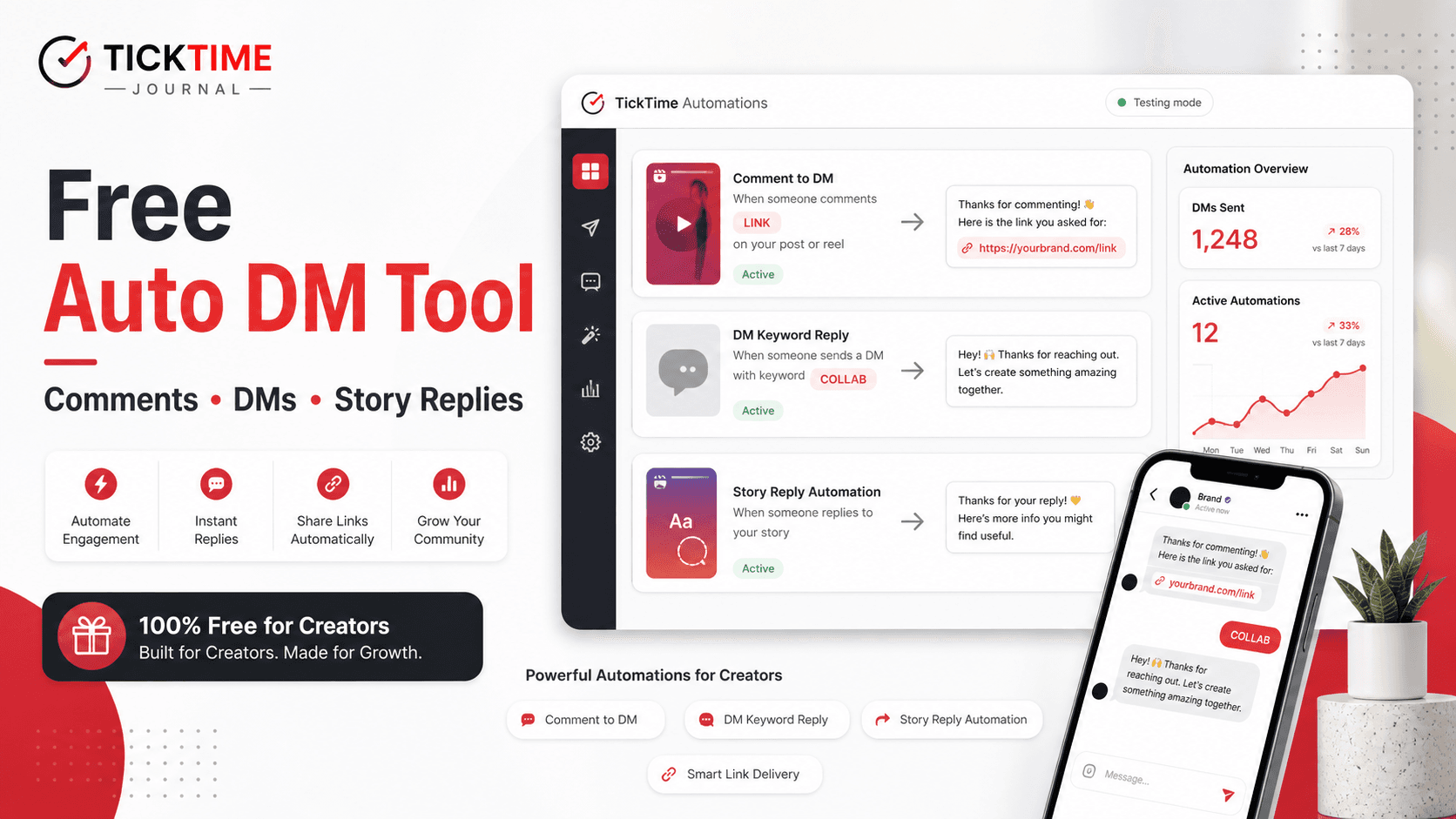
TickTime Automations is built for creators who want to reply faster and send the right information at the right moment. Inside your TickTime creator account, you can create automations for comments, DMs, and story replies.
| Feature | What it does | Creator use case |
|---|---|---|
| Comment to DM | When someone comments a keyword on a post or Reel, TickTime can send them a DM. | Send product links, campaign links, affiliate links, PDFs, or free resources. |
| Public comment reply | Reply publicly to the comment while also sending a DM. | Tell followers "Sent you a DM" so the post feels active and responsive. |
| DM keyword reply | Auto-reply when someone sends a specific keyword in DM. | Send your rate card, creator page, collab email, media kit, or brand inquiry form. |
| Story reply automation | Respond when followers reply to your story. | Handle story-based product questions, polls, launches, and link requests. |
| Keyword matching | Choose whether the trigger contains a word, exactly matches a word, or applies to any comment. | Control whether you reply to everyone or only to high-intent keywords. |
| Post and Reel selection | Choose selected posts/Reels or apply the automation more broadly. | Run separate automations for different campaigns, products, and lead magnets. |
| Automation stats | See active automations, triggers, and DMs sent. | Understand which posts are creating conversations. |
Try TickTime Auto DM Free Sign Up as Creator
1. Comment to DM: turn Reel engagement into conversations
The most popular Instagram automation use case is comment to DM. You ask followers to comment a keyword, and your automation sends them a private message.
For creators, this is useful because Instagram comments are public but links and detailed replies often work better in DMs.
Example workflows:
- Comment LINK to get the product link.
- Comment GUIDE to receive a free checklist.
- Comment COLLAB to get my creator page.
- Comment PRICE to receive rate card details.
- Comment OUTFIT to get all product links from the Reel.
TickTime lets you decide whether the automation should send a DM, reply publicly, or do both. That matters because a public reply can keep the comment section warm while the DM gives the follower the exact link or information they requested.
2. DM keyword reply: stop repeating your rate card and link replies
If you are growing as a creator, your DMs will start repeating themselves. Brands ask for your rates. Followers ask where to buy. People ask for a link you shared yesterday. New creators ask for resources.
With a DM keyword reply, you can set up simple keyword triggers:
- rate sends your rate card or creator page.
- collab sends your brand inquiry details.
- media kit sends your portfolio link.
- discount sends your affiliate code or campaign link.
- course sends your signup page.
This helps creators look more professional without hiring an assistant or buying a complex chatbot setup.
3. Story reply automation: capture interest while it is fresh
Stories are one of the highest-intent places on Instagram. When someone replies to a story, they are reacting to something they just saw. If your reply comes hours later, the moment may already be gone.
TickTime's story reply automation helps creators respond to story replies with a saved DM flow. You can use it for:
- Product drops.
- Affiliate offers.
- Workshop registrations.
- Brand campaign FAQs.
- Giveaway instructions.
- Creator service inquiries.
For example, if you post a story saying "Reply GUIDE and I will send the checklist", TickTime can handle the reply flow while you focus on creating content.
4. Public reply plus DM: make comments work harder
When a follower comments a keyword, you may want two things to happen:
- Send them the actual link privately.
- Reply publicly so the comment section shows that you are active.
TickTime supports both. A public reply like "Sent you a DM" or "Check your DMs" keeps the post feeling alive, while the DM sends the deeper information.
This is useful for creators running:
- Affiliate campaigns.
- Product review posts.
- Brand collaborations.
- Free resource giveaways.
- Launch announcements.
5. Suggested keywords: build faster
TickTime's automation builder includes keyword and public reply setup, plus suggestion support based on your post context. This helps you create automations faster instead of staring at a blank setup screen.
Creators can start simple with one keyword and one DM message. As you learn what your audience asks for, you can refine the keywords and message variants.
Free Auto DM Tool vs paid Instagram automation tools
Tools like Manychat and Chatfuel have made Instagram automation popular. Manychat's pricing page lists a free tier with basic automations and paid plans starting from higher tiers as creators need more contacts, more automations, advanced inbox features, or AI. Chatfuel also positions free automation tools as an entry point, with paid AI Pro plans for more advanced sales and support workflows.
That proves the demand is real: creators and businesses need automation. But many creators do not want to pay monthly just to send simple replies, creator links, campaign links, or rate card details.
TickTime's Free Auto DM Tool is built around creator-first needs:
- Comment to DM for posts and Reels.
- DM keyword replies.
- Story reply automation.
- Public comment replies.
- Instagram connection and permission checks.
- Automation stats for triggers and DMs sent.
- A creator account connected to TickTime's broader collab ecosystem.
This makes it especially useful for creators who want a free Instagram automation tool without starting from a business-heavy chatbot platform.
Best use cases for creators
Send your creator page to brands
Create a keyword such as COLLAB. When a brand or follower DMs that word, send your TickTime creator page with your niche, rates, recent work, collaboration terms, and contact details.
Share product links from Reels
If your Reel features a product, ask followers to comment LINK. Send the product link privately so people do not have to search your bio or old story highlights.
Deliver free resources
If you offer a checklist, guide, preset, Notion template, recipe, workout plan, or travel list, use Auto DM to send it instantly when someone comments a keyword.
Handle brand campaign questions
When you are part of a brand campaign, followers may ask about price, code, availability, shipping, or product details. Auto DM keeps those replies organised.
Collect collab leads
If brands discover you through Instagram, a fast DM response can move them to your creator page, portfolio, or email. That can help you look more professional and reduce missed opportunities.
How to use TickTime's Free Auto DM Tool
- Create a free TickTime creator account: Sign up as a creator on TickTime.
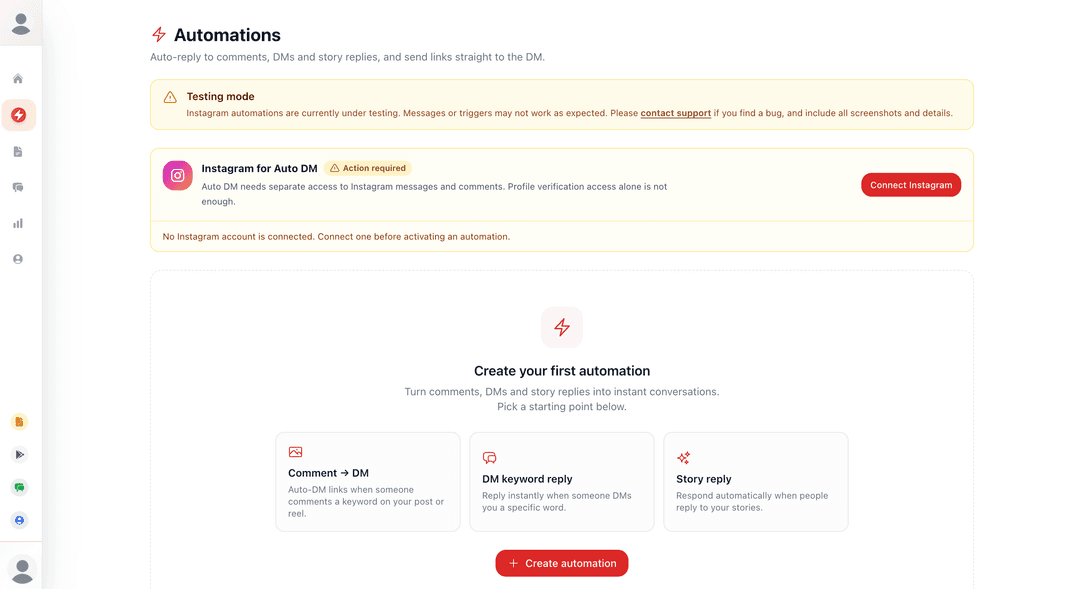
- Open Automations: Go to your creator dashboard and open the Automations page.
- Connect Instagram: Give the required Instagram messages and comments permissions. Profile verification access alone is not enough for Auto DM.
- Create your first automation: Choose comment, DM keyword, or story reply as the trigger.
- Add keywords: Use words like link, price, guide, collab, rate, discount, or any keyword your audience will use.
- Write your DM: Add the exact message you want followers to receive.
- Choose public reply if needed: For comments, you can reply publicly and send a DM.
- Activate and test: Test with a low-risk post first, then improve the message.
Note: Instagram automations on TickTime are currently under testing. Connect Instagram carefully, grant the required permissions, and test automations before using them on a high-volume campaign post.
Open Auto DM Tool Join TickTime Free
FAQ: Free Instagram Auto DM Tool
What is the best free Instagram Auto DM tool for creators?
The best free Instagram Auto DM tool depends on what you need. TickTime is built for creators who want to auto-reply to comments, DMs, and story replies, send links in DM, and connect automation with their creator collab workflow.
Can I automatically DM someone who comments on my Instagram Reel?
Yes. With a comment to DM automation, you can set a keyword such as "link" or "guide". When someone comments that keyword on your selected post or Reel, TickTime can send them a DM.
Can I auto-reply to Instagram DMs with a keyword?
Yes. TickTime supports DM keyword replies. For example, if someone sends "rate card", "collab", or "media kit", your automation can reply with the relevant message or link.
Can Instagram story replies trigger an automated DM?
TickTime includes story reply automation for creators. This can be useful for story-based link requests, product questions, giveaways, resources, or campaign replies.
Is TickTime Auto DM free?
TickTime is offering Auto DM automation as a free creator tool. The feature is currently under testing, so creators should test carefully before using it on major campaign posts.
Do I need to share my Instagram password?
No. You should never share your Instagram password with any automation tool. TickTime uses Instagram connection and permission access for automations, not your password.
What can creators send through Auto DM?
Creators can send product links, creator page links, rate card links, media kit links, affiliate links, discount codes, free resources, event links, and brand inquiry details.
Final takeaway
Instagram growth is not only about posting more. It is also about responding faster when people show interest. A follower who comments "link" or DMs "collab" is giving you a signal. If you reply late, the moment can disappear.
TickTime's Free Auto DM Tool for Instagram creators helps you turn comments, DMs, and story replies into useful conversations. Use it to send links, manage campaign questions, share your creator page, deliver resources, and look more professional without paying for a heavy automation stack.