

If you are a creator trying to get more brand collabs in 2026, your Instagram bio alone is not enough. Brands do not just want to know your follower count. They want to know your niche, engagement, past work, content quality, rates, availability, verification status, and whether you are a good fit for their campaign.
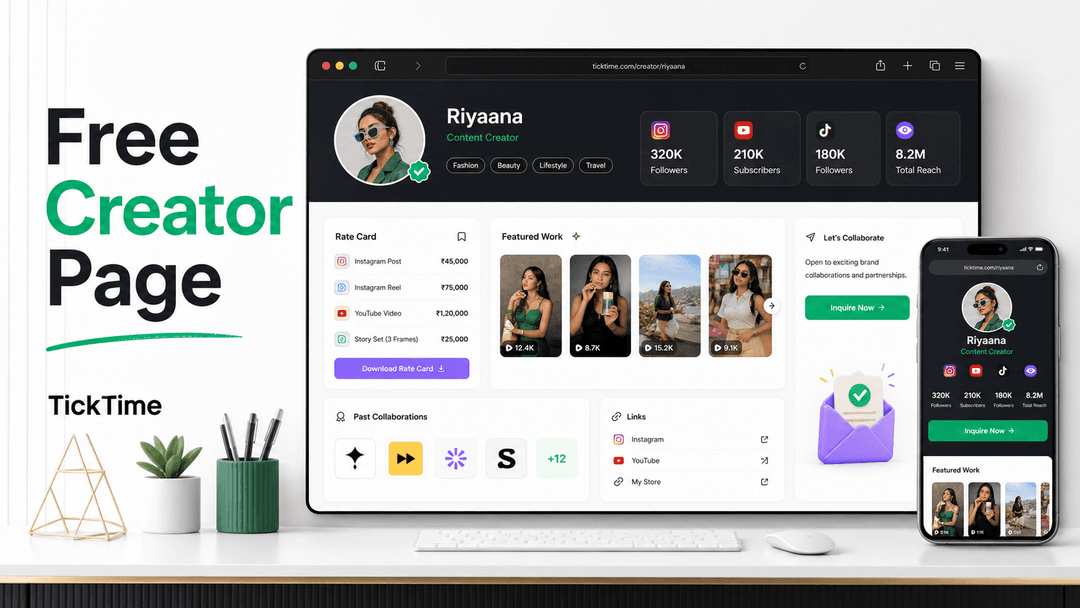
That is exactly why TickTime gives influencers a free creator page: a public, shareable profile that works like a mini media kit, creator portfolio, rate card, and link-in-bio page in one place.
Instead of sending screenshots, old campaign links, and rate details across DMs, you can send one clean URL: your TickTime Creator Page.
Create Your Free Creator Page Open My Creator Page
What Is a Creator Page?
A creator page is a public profile where influencers can showcase who they are, what kind of content they make, the brands they have worked with, and how a brand can collaborate with them.
Traditional link-in-bio tools are useful because they collect multiple links in one place. But for influencer marketing, a basic link page often misses the most important information brands need before sending a collaboration offer.
A brand manager looking for creators is usually asking questions like:
- Is this creator active?
- What is their niche?
- How strong is their engagement?
- Have they worked with brands before?
- What type of deliverables do they offer?
- Are they open to barter collaboration, paid campaigns, or both?
- Are their phone, email, social account, and profile verification signals complete?
- Can I contact them without wasting time?
Your TickTime Creator Page is built around these questions. It helps creators look professional and helps brands make faster decisions.
Why Influencers Need More Than a Link in Bio
Search interest around link-in-bio pages, creator portfolio pages, and influencer media kits keeps growing because social platforms still make external linking limited. Instagram allows multiple bio links, and many creators use dedicated link pages to organize their offers, content, shops, and communities.
But if your goal is brand collaborations, a creator page should do more than send people to YouTube, Instagram, or a WhatsApp number. It should reduce the brand's doubt.
A good influencer page should answer the brand's first round of questions before they even message you. That is the difference between a simple link-in-bio page and a brand-ready creator portfolio.
What Makes the TickTime Creator Page Different?
The TickTime Creator Page is designed specifically for influencers and creators who want paid campaigns, barter collabs, gifting campaigns, UGC work, and long-term brand partnerships.
It brings together the information brands usually ask for manually:
- Your public creator profile URL
- Your bio, niche, location, and content categories
- Your social media accounts and audience stats
- Your rate card for Reels, Stories, Shorts, videos, UGC, or packages
- Your featured work and best-performing content
- Your past brand collaborations
- Your spoken languages
- Your custom links
- Your intro video
- Your verification signals
- Your collaboration preferences and categories you do not accept
That means your page works like a free influencer media kit that can be shared with brands, agencies, campaign managers, and anyone looking for creators.
1. A Public Creator URL You Can Share Anywhere
Every creator page has a clean public URL in the format:
ticktime.media/creator/yourusername
You can add this link to your Instagram bio, YouTube description, WhatsApp status, email signature, campaign applications, pitch messages, and brand DMs.
If you are logged in, you can also open your own page from:
https://ticktime.media/creator/me
TickTime will redirect you to your public creator page if your username is already set. If your username is missing, it will guide you back to your influencer profile settings.
2. Public or Private Visibility Control
Not every creator wants their page public immediately. Some creators want to finish their rate card, add featured work, verify their profile, and connect Instagram first.
TickTime gives you a simple visibility toggle:
- Public: Anyone with your link can view the page.
- Private: Only you can view it while you complete your setup.
This is helpful because you can build your page properly before sharing it with brands. Once it looks ready, turn it public and start using it as your main creator portfolio link.
3. Themes That Match Your Creator Vibe
Your creator page should feel like you. TickTime includes multiple visual themes so your page does not look like a plain form or a boring resume.
Available theme styles include:
- Minimal: Clean, simple, professional.
- Gradient: Soft, colorful, creator-friendly.
- Neon: Dark, bold, high-energy.
- Brutalist: Sharp, striking, editorial.
- Editorial: Warm, polished, premium.
The best part is that your content stays the same. You can change the design whenever you want without rebuilding your profile.
4. Verified Social Stats That Brands Can Actually Use
Brands do not want inflated numbers. They want signals that help them understand whether your audience is real, active, and relevant.
Your TickTime Creator Page can show key creator stats such as:
- Total followers
- Average engagement rate
- Average views
- Average likes and interactions
- Recent posts
- Post performance
- Social account details
- Hashtags and mentions
- Engagement trend
To make this data useful, creators should connect their Instagram account and refresh their stats using the TickTime Instagram scraper extension where needed. The page can guide you if your Instagram is not linked or your stats look out of date.
This matters because brands are moving away from follower-only decisions. A creator with 15,000 followers and strong engagement can often be more valuable for a niche campaign than a creator with 100,000 passive followers.
5. A Built-In Rate Card for Reels, Stories, Shorts, and UGC
One of the biggest reasons creators lose deals is unclear pricing. If a brand has to ask your rates, wait for a reply, negotiate deliverables, and decode what is included, the conversation slows down.
TickTime lets you add a creator rate card directly to your page. You can list deliverables like:
- Instagram Reel
- Story series
- YouTube Short
- Dedicated YouTube video
- UGC video
- Product photography
- Package deal
- Barter collaboration
- Paid brand collaboration
Each rate card item can include a price label and a short description of what is included. For example:
Instagram Reel: From INR 15,000. Includes one concept, one edited Reel, caption, and brand tag.
Story Series: From INR 5,000. Includes 3 to 5 Instagram Stories with link sticker and brand mention.
You do not need to reveal every final negotiation detail, but giving brands a starting point helps them understand whether you fit their campaign budget.
6. Featured Work That Sells Your Content Quality
Your follower count gets attention. Your work closes the deal.
TickTime lets you add featured work to your creator page. This can include your best Reels, Shorts, campaign videos, product reviews, travel content, food videos, fashion transitions, skincare routines, tech demos, or UGC samples.
For each featured work item, you can add:
- Title
- Performance stat, such as 62K views or 8 percent engagement
- Image URL
- External link to the post or campaign
This is important because brands often judge creators by content quality, not just audience size. A strong featured work section helps you prove your style quickly.
7. Past Brand Collaborations for Instant Trust
If you have worked with even a few brands, show it. Social proof helps brands feel safer when they are choosing between multiple creators.
TickTime allows you to add past brand collaborations with:
- Brand name
- Result label, such as 3 Reels, 1 Story set, or 40K views
- Short notes
- External campaign link
If you are a new creator, you can start with small barter collaborations, gifted product content, UGC samples, or personal content that looks brand-ready. Over time, your creator page becomes proof of your growth.
8. Intro Video for a Better First Impression
Brands want to know your personality, confidence, voice, and content style. A short intro video can make your page feel more human and memorable.
TickTime supports an intro video URL, including YouTube or Shorts links. Use this section to add:
- A creator introduction
- A showreel
- A pinned campaign video
- A best-performing short-form video
- A short pitch explaining your niche
Keep it clear and brand-friendly. A strong 30 to 60 second intro can do more than a long paragraph.
9. Custom Links for Your Full Creator Ecosystem
Your TickTime Creator Page can also act as a link-in-bio for influencers. You can add custom links such as:
- Instagram profile
- YouTube channel
- Amazon storefront
- Portfolio drive
- WhatsApp contact link
- Newsletter
- Personal website
- Shop link
- Podcast link
- Press features
This makes your page useful for both brands and followers. The difference is that TickTime keeps brand collaboration information at the center.
10. Languages and Category Preferences
For Indian creators, language and audience context matter a lot. A Hindi beauty creator, a Tamil food creator, a Bengali lifestyle creator, and an English tech reviewer may all be valuable for very different campaigns.
TickTime lets you add spoken languages so brands can match you with the right audience.
You can also add categories you are not accepting. For example:
- Alcohol
- Tobacco
- Gambling
- Political promotions
- Categories that do not fit your personal brand
This helps protect your creator identity and saves time by filtering out the wrong campaigns early.
11. Verification Signals That Help Brands Trust You
Brand teams receive many creator applications. Verified creators naturally feel safer to work with because they are easier to identify, contact, and evaluate.
TickTime supports multiple trust signals, including:
- Email verification
- Phone verification
- Aadhaar document verification for creator profile trust
- Linked and verified social accounts
- Platform verified signals where available
TickTime's internal recommendation logic also gives strong weight to verification and trust signals. Full TickTime profile verification, email and phone verification, TickTime rating, platform verification, engagement rate, follower count, linked account verification, recent activity, recent login, profile completeness, and collaboration experience all contribute to how confidently a creator can be recommended to brands.
This does not mean verification guarantees collabs. But it does mean a complete and verified profile gives brands fewer reasons to hesitate.
How to Set Up Your Free Creator Page on TickTime
Here is a simple setup checklist for creators who want more brand collaborations through TickTime.
Step 1: Sign Up as an Influencer
Create your TickTime influencer account and choose a clean username. Your username becomes part of your public creator page URL, so keep it simple and close to your Instagram or YouTube handle.
Step 2: Complete Your Basic Profile
Add your name, bio, profile photo, location, niche, categories, and collaboration preferences. Your bio should quickly explain what you create and who your audience is.
Example:
I create honest skincare and beauty content for young Indian women, with a focus on product reviews, routine videos, and affordable self-care brands.
Step 3: Connect Your Instagram and Social Accounts
Linking your social accounts helps brands see your real reach and creator activity. If your Instagram data is missing or outdated, use the TickTime Instagram scraper extension to refresh followers, posts, engagement, and recent content.
Creators with fresher social data look easier to evaluate and more campaign-ready.
Step 4: Verify Email, Phone, and Aadhaar Details
Complete verification wherever applicable. For creators, verification is not just a badge. It helps brands trust that they are working with a real person, reachable contact details, and a more complete TickTime profile.
Step 5: Add Your Rate Card
Add your main deliverables and starting prices. If you are open to barter collaboration, mention that clearly. If you accept paid influencer campaigns only, mention that too.
Good rate card items are specific:
- 1 Instagram Reel
- 1 Reel + 3 Story frames
- 1 YouTube Short
- 1 UGC video without posting
- Monthly creator package
Step 6: Add Featured Work and Past Brand Collaborations
Pick your best work, not every piece of content you have ever posted. Brands should be able to scan your page and instantly understand your quality.
If you have worked with brands, add them. If you have not, add content samples that look like brand collaborations. A good portfolio can help you get your first barter campaign or paid collaboration.
Step 7: Add Custom Links and an Intro Video
Add your most useful links and one intro video or showreel. Do not overcrowd the page. The goal is to make brands take action, not make them scroll through everything you have ever created.
Step 8: Turn Your Page Public and Share It
Once your page is ready, turn visibility to public. Then add the link to:
- Your Instagram bio
- Your YouTube channel description
- Your WhatsApp business profile
- Your email signature
- Your brand pitch message
- Your campaign applications
Open My Creator Page Create Free Account
What Brands See When Your Creator Page Is Strong
A strong creator page makes you easier to shortlist. Instead of guessing, brands can quickly understand:
- What content you make
- Which audience you reach
- How active your profile is
- What your engagement looks like
- What content formats you offer
- What your starting rates are
- Which brands you have worked with
- Whether your profile is verified
- Whether you are open to their category
- How to send you an inquiry
That is the real advantage. Your creator page reduces back-and-forth and makes you look ready for serious campaigns.
Free Creator Page vs. Influencer Media Kit: Do You Need Both?
An influencer media kit is usually a PDF or document that includes your stats, audience details, content examples, and rates. It is useful, but it can become outdated quickly.
A TickTime Creator Page is better for everyday use because it is public, easy to update, and designed to include live creator information.
| Feature | Traditional Media Kit | TickTime Creator Page |
| Easy to share | Yes, as PDF or link | Yes, as public URL |
| Easy to update | Needs manual editing | Editable from profile settings |
| Custom links | Limited | Built in |
| Rate card | Manual | Built in |
| Featured work | Manual screenshots or links | Built in |
| Verification signals | Usually missing | Shown through TickTime profile data |
| Brand inquiry flow | Usually external | Built into creator page experience |
You can still keep a PDF media kit for some agencies, but your creator page should become your live, always-current public profile.
Best Practices to Get More Collabs From Your Creator Page
Here is how to make your free creator page work harder for you.
Use a Clear Creator Bio
Do not write only "DM for collab." Say what you create, who watches you, and what brands should hire you for.
Keep Your Rates Understandable
Brands do not need your entire negotiation strategy. They need a starting point. Use labels like "From INR 10,000" or "Package starts at INR 25,000" if your pricing changes by brief.
Feature Results, Not Just Pretty Posts
When possible, add stat labels: views, saves, clicks, leads, sales, engagement, or campaign deliverables. Brands remember outcomes.
Verify Your Profile
Complete email, phone, Aadhaar, and social account verification wherever available. Trust signals can make the difference when a brand is choosing between similar creators.
Refresh Your Social Data
If your creator stats are outdated, brands may assume your profile is inactive. Keep Instagram and other social data refreshed so your page reflects your real current reach.
Share the Page in Every Pitch
When you message a brand, do not only say "Hi, collab?" Send your creator page and a short reason you fit the brand.
Example pitch:
Hi, I am a lifestyle creator focused on affordable home and beauty finds. I think your product would fit my audience well. Here is my creator page with my stats, work samples, and rate card: [your TickTime creator page link].
FAQ: Free Creator Page for Influencers
Is the TickTime Creator Page free?
Yes. TickTime gives creators a free creator page that can be used as a public influencer portfolio, media kit, and brand collaboration page.
Is a creator page different from a link-in-bio page?
Yes. A link-in-bio page mainly organizes links. A TickTime Creator Page is built for influencer collaborations, so it can include social stats, rate cards, featured work, brand collaborations, verification signals, custom links, and a brand inquiry experience.
Can I add my influencer rate card?
Yes. You can add deliverables, price labels, and short descriptions. This helps brands understand your starting rates for Reels, Stories, Shorts, UGC, and other content formats.
Can I keep my creator page private?
Yes. You can keep the page private while setting it up, then turn it public when you are ready to share it.
Can brands contact me through my creator page?
TickTime creator pages include an inquiry experience so interested brands can reach out from the page.
Does verification help me get more brand collabs?
Verification does not guarantee collaborations, but it helps build trust. TickTime's recommendation logic also considers verification, engagement, follower count, recent activity, profile completeness, ratings, and collaboration experience when ranking creators for brands.
Who should use a TickTime Creator Page?
Nano influencers, micro influencers, UGC creators, Instagram creators, YouTubers, lifestyle creators, beauty creators, food creators, fashion creators, tech creators, travel creators, and any creator who wants a cleaner way to show their brand collaboration profile should use it.
Final Thoughts: Your Creator Page Is Your Brand Deal Home Base
If you want more brand deals, make it easy for brands to say yes.
Your TickTime Creator Page gives brands the information they need: your niche, stats, work, rates, social proof, verification signals, and collaboration preferences. It also gives you one simple link to share everywhere.
A strong creator page will not replace good content. But it will make your good content easier to sell.