
If you have ever posted "DM us to collab" on Instagram, you already know what happens next. Applications come through DMs, comments, emails, WhatsApp messages, Google Forms, and random screenshots. A few creators look great, some are not relevant, and by the time your team opens a spreadsheet, half the context is already lost.
That is why brands need a Creator CRM: a simple place to collect creator applications, review profiles, add notes, mark relevant creators, and export data when needed.
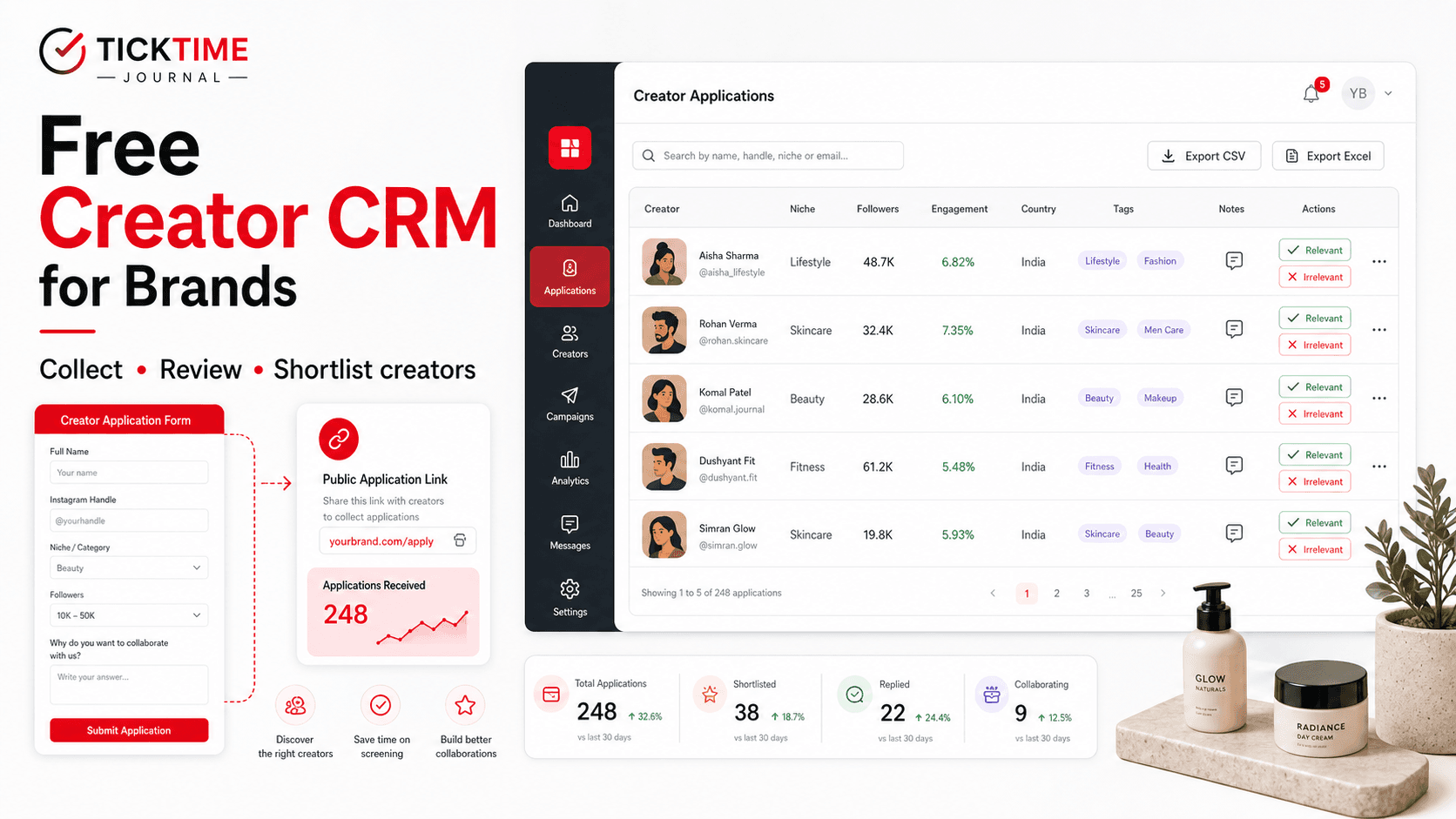
TickTime's Free Creator CRM for Brands is built for this exact workflow. It gives brands a free application inbox where creators can apply through a public form, and your team can search, filter, review, tag, decide, and export applicants without building a messy influencer spreadsheet from scratch.
Open Creator CRM Register as Brand
What is a Creator CRM?
A Creator CRM is a creator relationship management system for brands. Instead of tracking influencer applications in a sheet, it helps your team organise creator profiles, contact details, application status, notes, tags, and campaign fit in one place.
For influencer marketing teams, a Creator CRM sits between two workflows:
- Inbound creator applications: creators apply to collaborate with your brand.
- Campaign shortlisting: your team reviews applicants and chooses who should move forward.
Traditional sales CRMs are built for customers, leads, and sales pipelines. A creator CRM is different. It needs influencer-specific fields such as Instagram handle, follower count, engagement rate, average views, recent posts, address, campaign relevance, and collaboration notes.
Why brands need an influencer CRM in 2026
Influencer marketing has moved beyond one-off posts. Brands now run creator seeding, barter campaigns, paid collaborations, UGC campaigns, review campaigns, affiliate programs, and product launch creator lists. That creates one big operational problem: creator data gets scattered.
Without a creator CRM, brands usually end up with:
- Instagram DMs that nobody can search properly.
- Google Forms that collect applications but do not help with review.
- Spreadsheets that become outdated after one campaign.
- Duplicate creator entries.
- No fast way to compare followers, engagement, and recent content.
- No private notes or tags tied to the creator application.
- No easy export when the team needs to share data.
Large influencer platforms solve some of this for enterprise teams. But smaller D2C brands, startup brands, and fast-growing Shopify brands often need something simpler first: a free, usable application inbox that helps them collect and triage creator interest immediately.
That is the gap TickTime's Creator CRM is designed to fill.
What TickTime's Free Creator CRM does
TickTime's brand CRM is best understood as a free creator application inbox. Your brand gets a public application link, creators apply through a form, and your team reviews applications inside TickTime.
| Feature | What it does | Why brands use it |
|---|---|---|
| Public creator application form | Creators apply through a branded form link. | Replace scattered DMs with one application flow. |
| Application inbox | View incoming creator applications in one dashboard. | Track who applied and when. |
| Sheet view | Review applicants in a structured table. | Useful for high-volume campaigns and team review. |
| Swipe view | Review creator applications one by one. | Quickly mark creators as relevant or irrelevant. |
| Search and filter | Search name, handle, email, or tag; filter by decision. | Find the right creators faster. |
| Instagram profile metrics | View followers, engagement rate, posts, average likes, average comments, average views, and recent posts where available. | Compare applicants beyond just their Instagram handle. |
| Relevant / irrelevant decision | Mark creators as relevant, irrelevant, or undecided. | Build a shortlist without editing a spreadsheet. |
| Tags and private notes | Add a tag and internal notes for each applicant. | Remember why a creator is a fit for your brand. |
| CSV and Excel export | Download applications as CSV or XLSX. | Share data with teams, agencies, or campaign owners. |
Use Free Creator CRM Book a Demo
1. Collect creator applications with one public form link
The biggest problem with influencer outreach is not always finding creators. Sometimes it is handling the creators who already want to work with you.
TickTime gives your brand a public application link. You can share this link in:
- Your Instagram bio.
- Stories and highlights.
- Campaign posts.
- WhatsApp creator groups.
- Email newsletters.
- Influencer outreach messages.
- Your website collaboration page.
The creator application form collects key details such as name, email, phone, Instagram handle, and address. It also shows your brand profile information such as brand name, logo, Instagram, website, industry, and verified status where available.
This turns "DM us for collabs" into a cleaner application flow.
2. Review all applications in one inbox
Once creators apply, their applications appear inside your TickTime Creator CRM. Instead of switching between Instagram, spreadsheets, emails, and screenshots, your team gets one review screen.
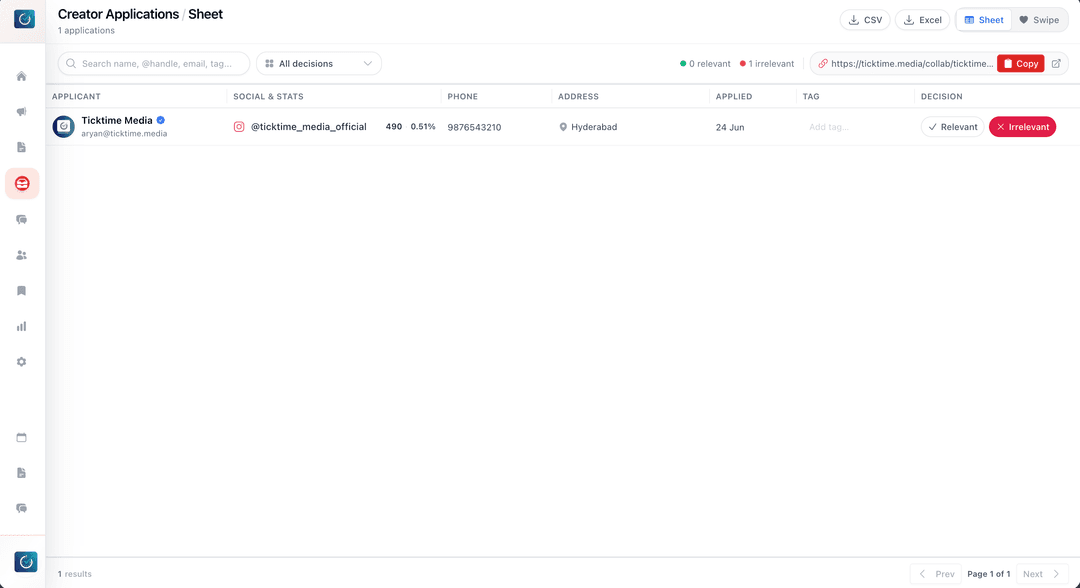
The application inbox shows useful information such as:
- Creator name.
- Email address.
- Phone number.
- Instagram username.
- Address.
- Application date.
- Decision status.
- Tag.
- Profile metrics where available.
This is useful for barter campaigns, paid collaborations, gifting campaigns, UGC collection, review campaigns, campus ambassador programs, affiliate programs, and product launch creator lists.
3. Search creators by name, handle, email, or tag
When applications grow, search becomes critical. TickTime's Creator CRM lets brands search by name, Instagram handle, email, or tag.
For example, your team can search for:
- A creator's name.
- An Instagram handle.
- An email address.
- A tag like beauty, Delhi, mom creator, fashion, YouTube, barter, review, or high priority.
This is where a CRM beats a basic form. A form collects data, but a CRM helps you reuse and act on it.
4. Mark creators as relevant or irrelevant
Not every creator who applies will be right for every campaign. Some may have the wrong niche, wrong location, weak engagement, unavailable address, low content quality, or audience mismatch.
TickTime lets you mark applications as:
- Relevant: worth shortlisting or reviewing further.
- Irrelevant: not a fit for the current brand or campaign.
- Undecided: needs more review.
The CRM also shows counts for relevant and irrelevant applications. This gives your team a quick sense of campaign pipeline quality.
5. Use Sheet view for structured review
Sheet view is built for brands that like spreadsheet-style review but do not want to maintain the spreadsheet manually. It shows creator applications in rows with fields for applicant details, social stats, phone, address, applied date, tag, and decision.
Use Sheet view when:
- Your brand has many creator applications.
- You want to compare applicants quickly.
- Your team needs table-style review.
- You want to update tags and decisions while scanning.
6. Use Swipe view for fast creator triage
Swipe view is built for faster human review. It shows one creator profile at a time with relevant profile information, review queue counts, recent decisions, tags, notes, and relevant/irrelevant buttons.
This is useful when your team wants to move through applicants quickly and build a shortlist without overthinking every row.
Swipe view can help answer:
- Does this creator match our category?
- Does the profile look credible?
- Does the engagement rate make sense?
- Would this creator fit a barter, paid, or review campaign?
- Should we keep them in the relevant pool?
7. Review Instagram metrics and recent posts where available
Follower count alone is not enough. TickTime's Creator CRM can show scraped Instagram profile data where available, including:
- Followers.
- Engagement rate.
- Post count.
- Average likes.
- Average comments.
- Average views.
- Recent posts with likes, comments, and views where available.
- Verified profile indicator where available.
This helps brands avoid shortlisting only by follower count. A creator with fewer followers but stronger engagement and recent content may be a better fit than a larger profile with weak average views.
8. Add tags and private notes
Creator review is not only data. Your team also needs judgment. TickTime lets you add a tag and private notes to each application.
Examples of useful tags:
- beauty
- fashion
- Delhi
- mom creator
- barter fit
- paid only
- high engagement
- review campaign
- UGC potential
Examples of useful notes:
- Good product demo style.
- Strong comments, but low average views.
- Relevant for skincare launch.
- Follow up for paid campaign later.
- Needs manual profile check.
This is how your brand starts building a reusable creator database instead of treating every campaign as a fresh search.
9. Export applications to CSV or Excel
Sometimes your team still needs files. TickTime's Creator CRM supports export to CSV and Excel, so you can share filtered applications with founders, campaign managers, agencies, or internal teams.
This is useful when you need to:
- Send a shortlist to a decision maker.
- Share relevant creators with a campaign owner.
- Backup your application data.
- Compare creator lists outside the platform.
- Plan outreach from a selected pool.
Free Creator CRM vs Google Forms and spreadsheets
| Workflow | Google Form + Spreadsheet | TickTime Creator CRM |
|---|---|---|
| Collect applications | Yes | Yes, through a public creator application link |
| Brand profile shown on form | Manual setup required | Brand profile is attached to the form |
| Search applicants | Basic sheet search | Search by name, handle, email, or tag |
| Decision workflow | Manual columns | Relevant, irrelevant, or undecided status |
| Instagram metrics | Manual checking | Profile metrics shown where available |
| Review mode | Spreadsheet only | Sheet view and Swipe view |
| Notes and tags | Manual columns | Built into each application |
| Export | Yes | CSV and Excel export |
Who should use TickTime's Free Creator CRM?
The Creator CRM is useful for:
- D2C brands collecting influencer applications.
- Small brands running barter campaigns.
- Brands launching a product and collecting creator interest.
- Agencies managing creator submissions for clients.
- Shopify brands looking for creators and UGC.
- Campus ambassador programs.
- Beauty, fashion, wellness, food, kids, home, and lifestyle brands.
- Teams that want a free influencer CRM before moving to full campaign management.
How to use TickTime Creator CRM
- Create a free brand account: Register your brand on TickTime.
- Open Creator CRM: Go to the brand CRM page.
- Copy your public application link: Share it with creators wherever you announce collaborations.
- Collect applications: Creators submit name, email, phone, Instagram handle, and address.
- Review applicants: Use Sheet view or Swipe view to compare profiles.
- Mark decisions: Choose relevant, irrelevant, or undecided.
- Add tags and notes: Keep internal context for future campaigns.
- Export if needed: Download CSV or Excel for team sharing.
- Move into campaigns: Use your relevant creator pool for barter, paid, review, or UGC campaigns.
Open Creator CRM Free Create Brand Account
FAQ: Free Creator CRM for Brands
What is a creator CRM?
A creator CRM is a system that helps brands manage creator relationships, applications, profile data, notes, tags, and shortlisting decisions for influencer marketing campaigns.
Is TickTime Creator CRM free?
TickTime offers a free Creator CRM/Application Inbox for brands to collect and manage creator applications. Brands can use it to start organising influencer interest without relying only on DMs and spreadsheets.
Can brands collect creator applications with TickTime?
Yes. Brands get a public application link where creators can submit their name, email, phone, Instagram handle, and address. The applications appear in the brand's TickTime Creator CRM.
Can I export influencer applications?
Yes. TickTime Creator CRM supports CSV and Excel exports, so brands can share or store creator application data outside the dashboard when needed.
Can I see Instagram profile metrics inside the CRM?
Where data is available, TickTime can show Instagram profile metrics such as followers, engagement rate, post count, average likes, average comments, average views, and recent posts.
Is this better than Google Forms for influencer applications?
Google Forms can collect data, but TickTime Creator CRM helps with the next step: reviewing applications, searching creators, filtering by decision, adding tags and notes, seeing profile metrics, and exporting shortlists.
Who should use a creator application inbox?
Any brand that receives creator collaboration requests should use an application inbox. It is especially useful for D2C brands, Shopify brands, startups, agencies, and brands running barter, paid, review, UGC, or product seeding campaigns.
Final takeaway
If creators are already asking to collaborate with your brand, do not let those leads disappear into Instagram DMs and spreadsheets. A Creator CRM gives your team a cleaner way to collect, review, tag, shortlist, and export influencer applications.
TickTime's Free Creator CRM for Brands helps you turn scattered creator interest into a usable application pipeline. Share your application link, review creators in one inbox, mark the best-fit profiles, and build a creator pool your brand can use for future campaigns.