
Shopify brands do not struggle because influencer marketing is impossible. They struggle because the workflow is scattered. One creator is in Instagram DMs, another is in WhatsApp, campaign details are in a sheet, product links are shared manually, and nobody knows which creator actually helped the store grow.
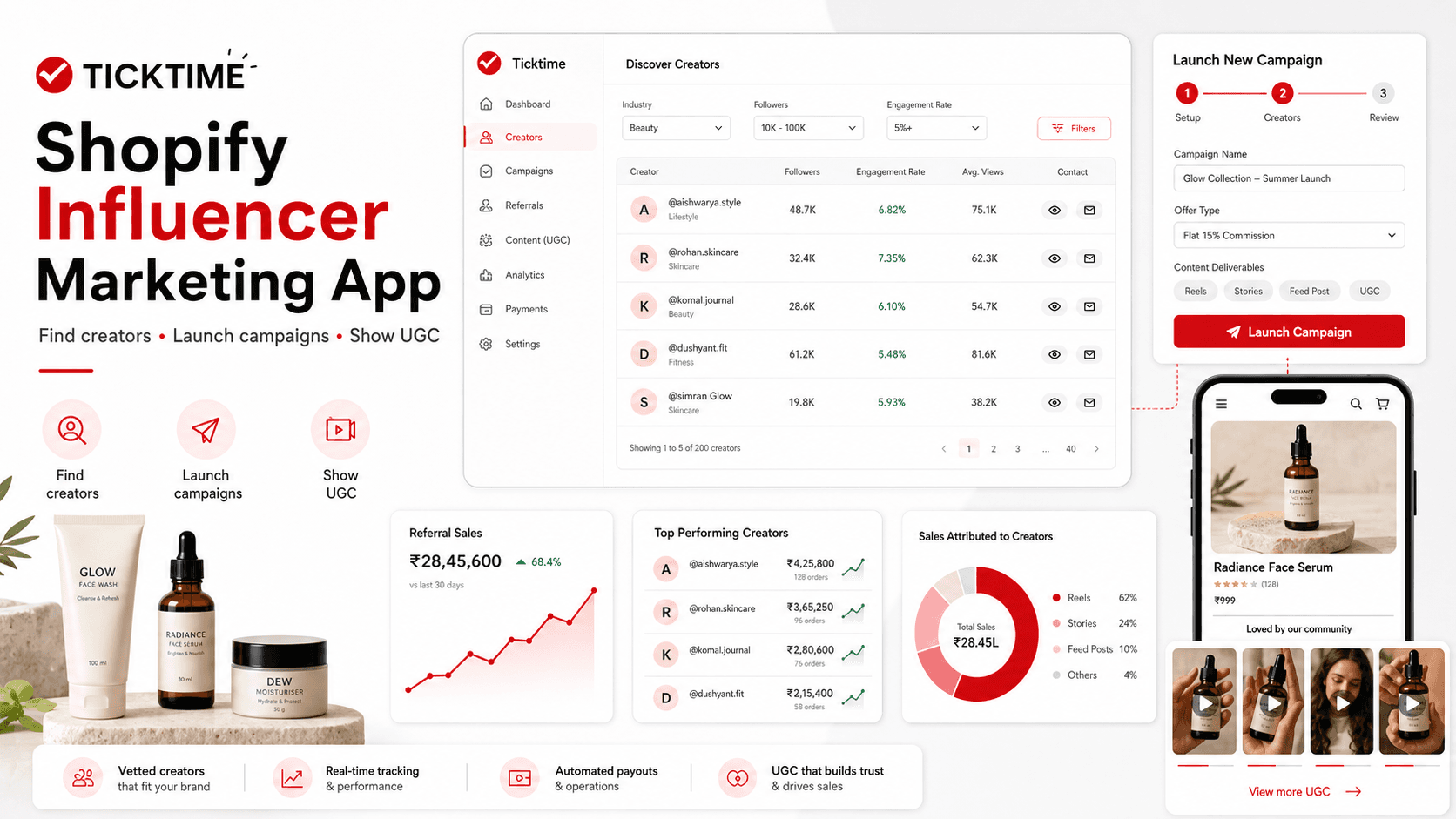
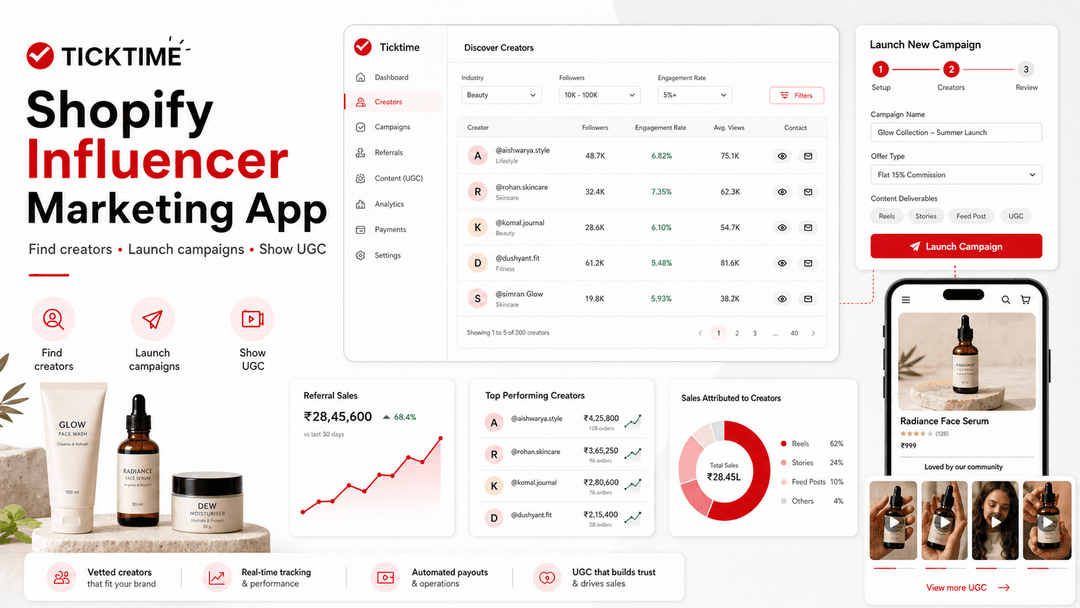
That is exactly where the Ticktime Shopify app fits in. Ticktime connects your Shopify store with Ticktime's influencer marketing platform so brands can discover relevant creators, reveal creator contact details, move into campaign creation, use referral tracking, and display approved creator UGC on Shopify product pages.
If you are searching for a Shopify influencer marketing app, influencer marketing Shopify app, Shopify creator marketing app, Shopify UGC app, or Shopify app for influencer campaigns, this guide explains how Ticktime works for D2C brands and why it can become a practical growth layer for your store.
Why Shopify brands need an influencer marketing app
For a Shopify store, influencer marketing is not just about getting a Reel posted. The real goal is to connect creator activity with store growth. A good creator campaign should help you build awareness, generate trustworthy content, bring shoppers to your product pages, and create signals you can measure later.
That is why Shopify influencer marketing apps have become important. Shopify Collabs positions creator discovery, gifting, affiliate links, and sales tracking as part of the merchant workflow. Other Shopify influencer apps also focus on finding creators, managing applications, and coordinating social posts. The market is moving in one direction: influencer marketing has to connect with commerce, not sit outside it.
Ticktime's Shopify app is built for the same core problem, but with Ticktime's India-focused creator ecosystem and campaign workflow for brands that want to run barter, paid, cash plus barter, review, and UGC-led campaigns from one connected system.
What is the Ticktime Shopify app?
The Ticktime Shopify app is an embedded Shopify app that connects a merchant's Shopify store with Ticktime's influencer marketing platform. It helps brands set up a Ticktime account from Shopify, discover creators by industry, review creator metrics, reveal creator contact details, open Ticktime campaign creation, use storefront referral tracking, and place approved influencer UGC on Shopify product pages.
In simple terms, Ticktime helps Shopify brands move from this:
Manual creator search + DMs + spreadsheets + unclear trackingto this:
Connected Shopify store + creator discovery + campaign workflow + referral tracking + product-page UGCThis is especially useful for D2C brands in categories like beauty, skincare, fashion, wellness, home, kids products, accessories, food, personal care, gadgets, and lifestyle products where creator-led trust can directly influence product discovery.
What Ticktime offers to brands
Ticktime is built as an influencer marketing and barter campaign platform for brands. On the brand side, Ticktime highlights access to 50,000+ vetted Indian creators, cash, barter, and cash plus barter campaign options, creator discovery filters, performance tracking, and campaign workflows from one dashboard.
The Shopify app brings that brand workflow closer to your store. Instead of treating Shopify and influencer marketing as two separate systems, the app lets a merchant start from the store, connect to Ticktime, and then move into creator discovery and campaign execution.
| Ticktime Shopify feature | What it does | Why it matters for a Shopify brand |
|---|---|---|
| Shopify onboarding | Connects your Shopify store and creates or links your Ticktime brand account | You can start creator marketing from your store workflow |
| Influencer discovery | Shows matched creators with industry filters and creator metrics | You can shortlist creators faster than manual Instagram searching |
| Creator performance signals | Displays followers, engagement rate, average likes, average views, platforms, city, state, and collab type | You can compare creators beyond follower count |
| Phone and email reveal | Lets brands reveal creator contact details within available monthly limits | You can move from research to outreach without losing the creator record |
| Campaign creation link | Opens Ticktime's campaign creation flow from inside the Shopify app | You can turn a shortlist into a real creator campaign |
| Referral tracking script | Detects referral codes in URLs, stores them for 30 days, tracks visits, and passes referral data into cart attributes | You get a stronger base for influencer attribution and campaign learning |
| UGC gallery block | Displays approved influencer content on Shopify product pages | You can use creator content as social proof near the buying decision |
1. Connect your Shopify store with Ticktime
After installing the Ticktime Shopify app, the merchant completes onboarding inside Shopify. The app asks for the information Ticktime needs to create or connect a brand account: work email, phone number, country code, brand or store name, store owner name, and Shopify shop domain.
The app also syncs the Shopify store with the Ticktime backend. Once connected, the brand can access the influencer discovery page and move into campaign workflows.
This matters because the first step of influencer marketing is often where brands drop off. They install a tool, do not know what to do next, and return to DMs. Ticktime makes the entry point clear: connect store, create brand account, view creators, and launch your first campaign.
Register on Ticktime if you want to create your brand account directly.
2. Discover creators inside the Shopify app
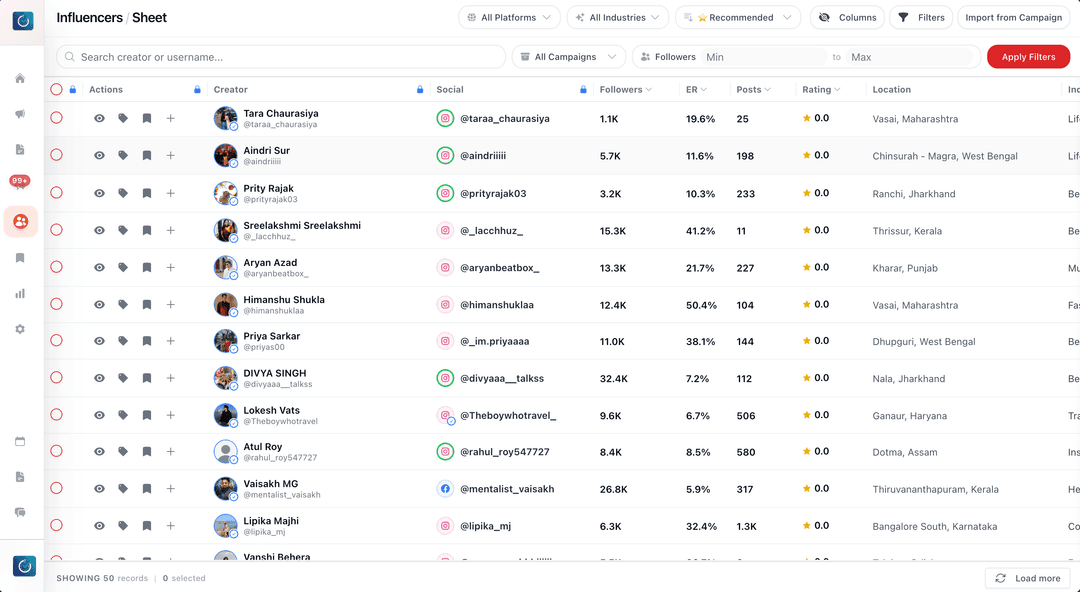
The main Shopify app screen is built around Influencer Discovery. It shows creators matched for your selected industry and lets you filter by industry from the app.
For each creator, brands can review useful signals such as:
- Creator name and profile image.
- Industry or niche.
- Total followers.
- Engagement rate.
- Average likes.
- Average views.
- Connected platforms such as Instagram and YouTube where available.
- City and state.
- Barter readiness.
- Collaboration types such as barter, paid, or other creator-selected options.
- Minimum collaboration amount where the creator has provided it.
This makes Ticktime useful for brands that care about creator fit. A Shopify store should not pick influencers only because they have a large follower count. It should compare category fit, engagement, content format, geography, average views, and the kind of campaign the creator is open to.
3. Reveal creator phone and email details when ready
Finding creators is only half the job. The next step is outreach. Ticktime's Shopify app includes contact reveal actions for phone and email, with monthly reveal limits shown in the dashboard.
This gives brands a more controlled way to move from discovery to outreach. Instead of randomly saving profiles, the brand can review the creator, decide whether the fit is strong enough, and then reveal contact information when it is ready to start the conversation.
For Shopify brands running gifting, barter, paid, or review campaigns, this can reduce wasted outreach because the brand is not chasing every creator. It is choosing creators after reviewing performance and fit signals.
4. Launch campaigns from Shopify into Ticktime
The Shopify app includes a clear campaign CTA that opens Ticktime's campaign creation workflow. This is important because creator discovery without campaign structure still becomes messy.
On Ticktime, brands can create campaigns around their actual marketing objective, such as product launch, UGC creation, influencer gifting, barter collaboration, paid creator promotion, seasonal sale, review campaign, or category awareness.
A strong Ticktime campaign brief for a Shopify brand should include:
- Campaign title.
- Product or collection to promote.
- Campaign type: barter, paid, cash plus barter, review, or UGC.
- Creator niche and location preference.
- Required platform such as Instagram or YouTube.
- Content format such as Reel, Story, YouTube Short, unboxing, review, or product demo.
- Deliverables and timelines.
- Usage rights or UGC expectations if the brand wants to reuse content.
- Tracking link, referral code, or campaign instructions.
This is where Ticktime becomes more than a Shopify influencer directory. It becomes a campaign operating system for brands that want repeatable influencer marketing instead of one-off creator DMs.
5. Use referral tracking for creator-led traffic
The Ticktime Shopify theme extension includes a referral tracking script. When a shopper lands on the store through a URL with a referral code, the script can store that code for 30 days, track the click event, clean the URL for a smoother shopping experience, and inject referral data into Shopify cart attributes.
In practical terms, this helps a brand preserve attribution context when a creator sends shoppers to the store. It does not replace the need for campaign analysis, but it gives Ticktime and the merchant a cleaner tracking base than sending untracked links in DMs.
For a Shopify influencer campaign, this helps answer better questions:
- Which creators are sending visitors?
- Which referral codes are being used?
- Which creators are worth repeating?
- Which products perform better with creator traffic?
- Which campaigns should move from barter to paid or commission-led deals?
6. Show approved creator UGC on product pages
The Ticktime Shopify app also includes a UGC gallery block through the theme extension. This block can fetch approved creator content from Ticktime and show it on Shopify product pages.
The UGC gallery can display:
- Creator images.
- Reel or video thumbnails.
- Creator handles.
- Captions.
- Featured content badges.
- Social post links.
- Like counts where available.
This is one of the most Shopify-specific benefits of Ticktime. Influencer content should not disappear after the creator posts. If the content is approved, it can become product-page proof for shoppers who are already considering a purchase.
Why UGC matters for Shopify conversion
Shopify shoppers often want more than polished studio images. They want to see how a product looks in real life, how someone uses it, what the texture or fit looks like, and whether people like them trust the product.
That is why UGC can be powerful for D2C categories. A creator unboxing a skincare kit, styling a fashion product, reviewing a wellness item, or showing a gadget in use can answer questions that product descriptions do not answer well.
For a brand, the ideal workflow is simple:
- Find the right creators on Ticktime.
- Run a barter, paid, or review campaign.
- Collect creator content.
- Approve the strongest UGC.
- Show that UGC on relevant Shopify product pages.
- Use campaign data to plan the next creator collaboration.
How Ticktime is different from manual influencer outreach
A Shopify brand can run influencer marketing manually, but the manual process usually breaks once the brand tries to scale beyond a few creators.
| Manual Shopify influencer workflow | Ticktime Shopify workflow |
|---|---|
| Search creators one by one on Instagram | Browse creators from inside the Shopify app |
| Judge creators mainly by follower count | Compare followers, engagement, views, platform, location, and collab type |
| Lose contact details in DMs and sheets | Reveal phone and email details through a controlled workflow |
| Campaign briefs get scattered | Create campaigns through Ticktime |
| Referral traffic is harder to connect | Use referral code tracking and cart attributes |
| Creator content gets used once | Show approved UGC on Shopify product pages |
Who should use the Ticktime Shopify app?
The Ticktime Shopify app is a strong fit for:
- D2C brands that sell through Shopify.
- Indian Shopify brands that want access to vetted creators.
- Brands that want to run barter, paid, cash plus barter, or review campaigns.
- Stores that want to find nano and micro influencers by niche and location.
- Brands that want creator content for product pages.
- Teams that want to reduce WhatsApp follow-ups, spreadsheets, and manual tracking.
- Shopify merchants that want a better way to connect influencer activity with store traffic and UGC.
It is especially useful if your brand has products creators can genuinely try, show, style, review, unbox, or demonstrate.
How to get started with Ticktime for Shopify
- Install or open the Ticktime Shopify app: Start from your Shopify admin.
- Complete onboarding: Add your work email, phone number, store name, owner details, and shop domain.
- Open influencer discovery: Browse creators matched for your industry.
- Compare creator fit: Review followers, engagement rate, average views, niche, city, state, and collab type.
- Reveal contact details: Reveal phone or email when a creator is worth outreach.
- Create a campaign: Launch the campaign through Ticktime with clear deliverables.
- Use referral tracking: Share referral-code links where relevant.
- Add approved UGC: Use the Ticktime UGC gallery block to show creator content on product pages.
- Measure and repeat: Double down on creators who deliver quality content, useful traffic, and stronger trust.
SEO FAQ: Ticktime Shopify influencer marketing app
What is a Shopify influencer marketing app?
A Shopify influencer marketing app helps merchants find creators, run influencer campaigns, coordinate gifting or paid collaborations, track referral activity, and connect creator content with the Shopify store.
Does Ticktime help Shopify brands find influencers?
Yes. Ticktime's Shopify app includes influencer discovery with industry filtering and creator details such as followers, engagement rate, average likes, average views, platform, location, barter readiness, and collaboration type.
Can Ticktime be used for Shopify barter campaigns?
Yes. Ticktime supports barter, paid, and cash plus barter campaign workflows for brands. Shopify brands can use Ticktime to find creators and move into structured campaign creation.
Does Ticktime support Shopify referral tracking?
Ticktime includes a Shopify storefront tracking script that detects referral codes in URLs, stores the code for 30 days, tracks clicks, and passes referral data into cart attributes for attribution workflows.
Can Ticktime show influencer UGC on Shopify product pages?
Yes. The Ticktime Shopify theme extension includes a UGC gallery block that can show approved influencer content on product pages, including images, video thumbnails, captions, creator handles, and featured posts.
Is Ticktime a Shopify Collabs alternative?
Ticktime is an option for brands that want a Shopify-connected influencer marketing workflow with Ticktime's creator discovery, barter and paid campaign system, referral tracking, and UGC gallery. Shopify Collabs is a first-party Shopify creator and affiliate tool; Ticktime is positioned around Ticktime's own creator network and campaign workflow for brands.
Which Shopify brands should book a Ticktime demo?
Book a demo if your Shopify store wants to use influencer marketing for product gifting, creator discovery, barter collaborations, paid campaigns, UGC, or referral-led growth, but your current process is stuck in DMs and spreadsheets.
Final takeaway
The best Shopify influencer marketing setup does not stop at finding creators. It connects the full workflow: store setup, creator discovery, contact reveal, campaign launch, referral tracking, approved UGC, and repeatable performance learning.
Ticktime gives Shopify brands a practical way to bring creator marketing closer to commerce. You can discover relevant creators, launch campaigns through Ticktime, track referral activity, and place approved influencer content where it can support buying decisions: your product pages.
Ready to run creator campaigns for your Shopify store?
Book a Demo or Register on Ticktime to start building your creator campaign workflow.